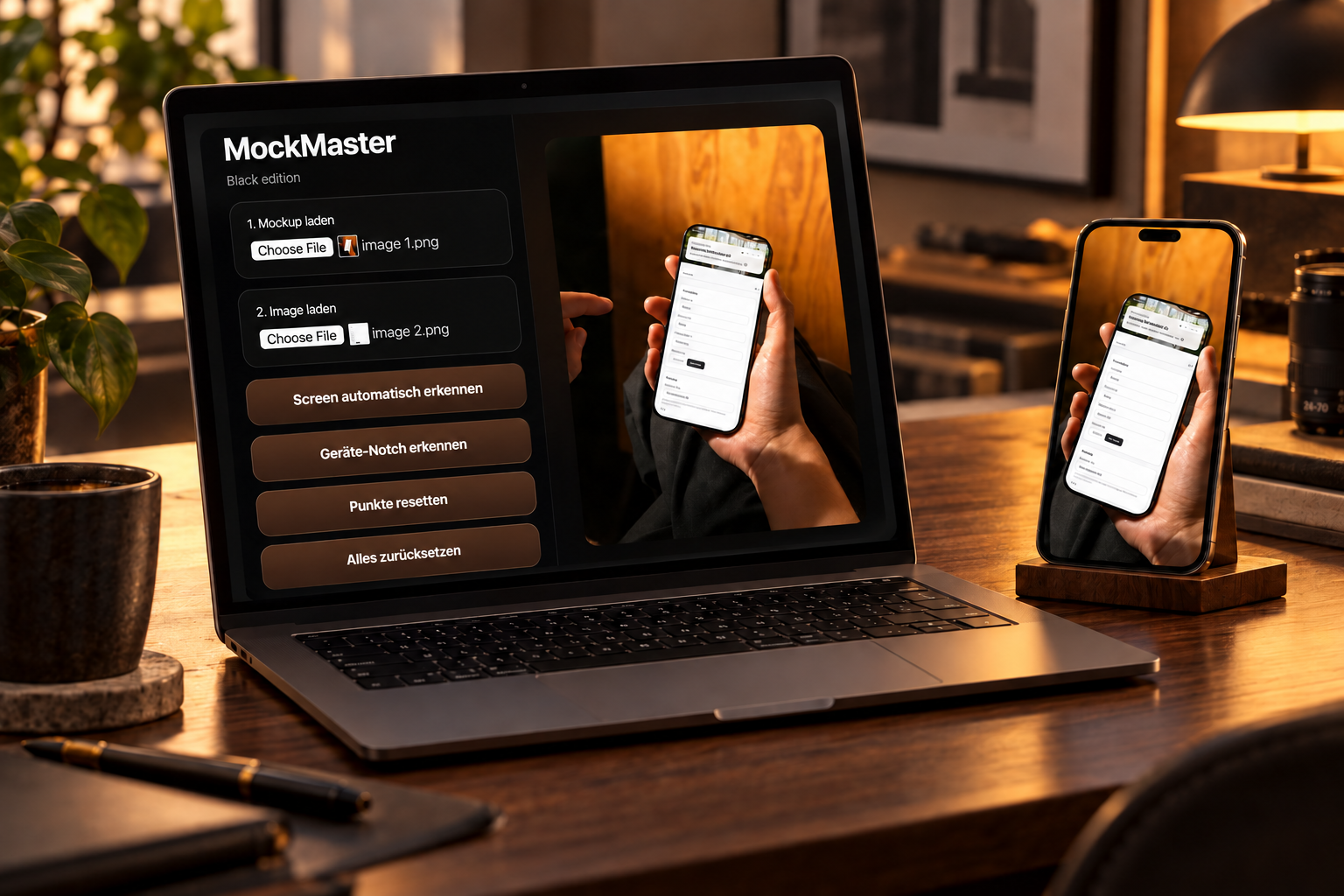
MockMaster places your app screenshot or website shot pixel-perfect into real photos of iPhone, iPad or laptop — with automatic screen and notch detection, a corner-radius slider and glass reflection. Marketing-ready mockups without Photoshop, without buying templates.
Six building blocks for mockups that look like real photos — for App Store Connect, landing pages, pitch decks and social posts.
OpenCV edge detection finds the screen in your photo automatically — even at extreme angles, with reflections or partly occluded corners. One click, four points snap in.
iPhone 14 Pro, 15, 16 in the shot? MockMaster detects the notch or Dynamic Island automatically and clips the screenshot to match — no more layer masking.
When the auto-detect misses: drag the four corner points manually. Live preview in the canvas — what you see is exactly what you export.
0 to 100% rounding. Fits your screenshot exactly to the display — from a MacBook's sharp corners to a round Apple Watch.
Optional reflection and highlight overlays turn a flat screenshot into a real display — subtle, never artificial. Studio look without a Photoshop stack.
One click, transparent background optional, original photo resolution. Ready to upload to App Store Connect, Framer, Webflow, or import into Keynote and Figma decks.
Four scenarios where MockMaster replaces half a Photoshop afternoon with three clicks.
Embed your app screenshot into a real iPhone photo instead of a generic cutout. For App Store Connect, Play Store, TestFlight landing pages — export at 6.7", 6.5", 5.5" and beyond.
Grab a MacBook or iMac photo, drop your landing-page screenshot in — instant hero image for your own site, a Framer case study or a Dribbble shot.
Investor deck, sales one-pager, Product Hunt launch. A consistent mockup style across 50 slides — instead of hunting a different Photoshop template every time.
Instagram post, LinkedIn announcement, Twitter screenshot — MockMaster gives your whole content pipeline a unified look, without needing to be a photographer or designer.
No tutorial required. Open MockMaster, drop in a photo, drop in a screenshot, export.
iPhone on a desk, laptop in a café, iPad in someone's hand. Any JPG, PNG or WebP.
Add your app or website screenshot and click "Auto-detect screen".
Corner radius to match the device, notch adjustment, glass layer, opacity. Live preview in the canvas.
One click — full-resolution image in your Downloads folder. Ready for App Store, site or deck.
MockMaster is a plain macOS app — no account, no subscription, no watermark. Everything runs locally on your Mac.
Click Download MockMaster — free. Open the DMG and drag MockMaster.app into your Applications folder.
Because the app isn't Apple-notarized yet: right-click → Open → Open. One-time step, double-click works from then on.
Everything runs locally on your Mac. No servers, no uploads, no telemetry — your screenshots stay with you.
MockMaster places app or website screenshots into real photos of iPhone, iPad or laptop. Typical use cases: App Store screenshots, landing-page hero images, pitch decks, Product Hunt launches, LinkedIn announcements, social-media posts, Dribbble shots.
Classic mockup templates in Photoshop rely on prepared smart objects — you're locked to the template. MockMaster works differently: you bring any photo, it finds the screen via OpenCV edge detection and warps your screenshot into that exact perspective. No asset purchase, no layer hunting, no subscription.
Yes. If your mockup photo shows a MacBook, iMac or monitor, MockMaster fits your website screenshot exactly into the display area — including correct corner-radius for rounded displays and an optional glass reflection.
Yes. "Detect device notch" scans the photo for the typical notch or Dynamic Island contour and clips the screenshot to fit. On older iPhones (home button or classic notch) you can also disable the notch cut.
Yes. MockMaster is a fully free macOS app — no watermark, no subscription, no email sign-up, no account. Direct DMG download.
The current build is Apple Silicon only (M1, M2, M3, M4 or newer), macOS 11 (Big Sur) and up. A universal build for Intel is planned.
PNG at the mockup photo's full resolution, transparent background optional. Directly uploadable to App Store Connect, Google Play, Framer, Webflow, or importable into Keynote, Figma and Photoshop.
Yes. MockMaster runs entirely locally — no upload, no cloud, no analytics on your images. Anything you load stays on your Mac.